
GLF. Connect now delivers in-system reports to you by email, so you no longer need to wait on the screen while a report is prepared. When you generate a report, a pop-up confirms that your report is being created, and an email with a secure download link is sent to you as soon as it is ready. This means you can carry on using GLF. Connect while your report is generated in the background.
What's New
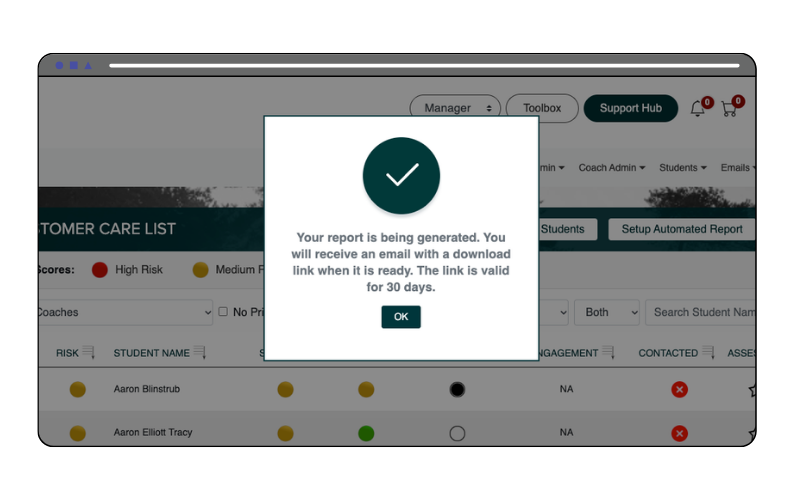
- Confirmation pop-up – When you generate an in-system report, a pop-up now confirms that your report is being generated and that you will receive an email with a download link when it is ready.
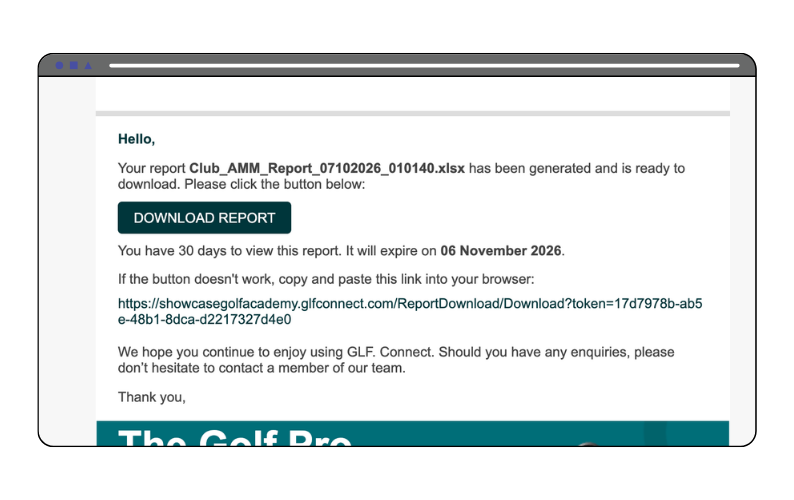
- Report delivered by email – Once your report is ready, you will receive an email containing the report name and a Download Report button. If the button does not work, the email also includes a link you can copy and paste into your browser.
- 30-day download window – The download link in the email is valid for 30 days, and the email shows the exact date it will expire.
- Keep working while your report generates – Select OK on the pop-up and carry on working. There is no need to stay on the page while your report is prepared.
A list of the impacted reports are provided below:
Manager User Role:
- Customer Care List Reports i.e AMM Engagement Report
- Lesson Income Reports
- Dashboards Export
- Duplicate Students Report
- All Students Export
Coach User Role:
- Customer Care List Reports i.e AMM Engagement Report
- Lessons Delivered
- Lesson Packages
- Lessons Delivered Lite
- Weekly Report
- Dashboards Export